How Watchlists Work on Streaming Apps?
With thousands of movies, TV shows, documentaries, and live programs available on streaming services, it’s easy to come across content you want to watch later. Instead of trying to remember every interesting title, most streaming apps include a feature called a watchlist.
A watchlist is a simple but powerful tool that lets you save movies and TV shows for future viewing. Whether you’re browsing during your lunch break or searching for something to watch on the weekend, adding titles to your watchlist helps you quickly find them again without searching from scratch.
Almost every major streaming platform includes some version of a watchlist, making it one of the most useful features for staying organized and getting the most from your streaming subscriptions.
In this guide, you’ll learn how watchlists work, why they’re helpful, and how to keep your streaming library organized.
What Is a Watchlist?
A watchlist is a personal collection of movies, TV shows, documentaries, or other content that you’ve chosen to save for later.
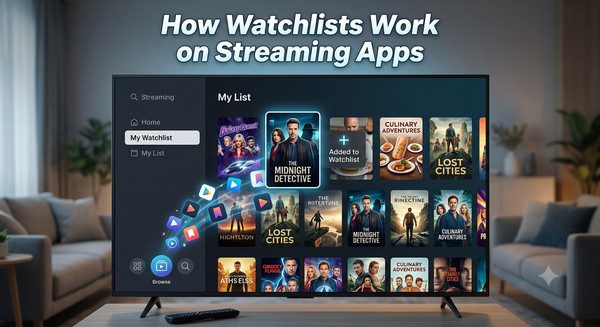
Instead of watching something immediately, you simply add it to your watchlist. The next time you open the streaming app, your saved titles are waiting in one convenient location.
Think of it as creating your own entertainment playlist.
How Does a Watchlist Work?
Using a watchlist is usually very simple.
When browsing a streaming app, you’ll often see an option such as:
- Add to Watchlist
- Save for Later
- Add to My List
- Favorite
Selecting this option adds the title to your personal collection. Your watchlist is linked to your account, so it’s usually available across all supported devices after you sign in.
This means you can add a movie on your phone and watch it later on your Smart TV.
Why Use a Watchlist?
As streaming libraries continue to grow, remembering every interesting movie or TV show becomes difficult.
A watchlist helps you:
- Save movies for later.
- Keep track of TV series you want to start.
- Avoid searching for the same title multiple times.
- Create a personal collection of recommendations.
- Quickly find something to watch.
It’s one of the easiest ways to organize your streaming experience.
Watchlists Across Multiple Devices
Most streaming services synchronize your watchlist across devices.
If you’re signed into the same account, changes made on one device usually appear automatically on others.
For example, you can:
- Add a movie from your laptop.
- Browse your watchlist on your tablet.
- Watch the movie later on your Smart TV.
This makes your saved content available wherever you choose to stream.
Can You Organize Your Watchlist?
Organization features vary between streaming platforms, but many services allow you to:
- Remove titles you’ve already watched.
- Reorder saved content.
- Sort by recently added items.
- Filter by movies or TV shows.
- Continue watching unfinished programs.
Some services automatically recommend similar titles based on what’s already in your watchlist.
Benefits of Using Watchlists
Save Time
Instead of browsing hundreds of titles every time you open a streaming app, your watchlist provides a ready-made selection of content you’re already interested in.
Never Forget Interesting Titles
When you hear about a great movie or TV series, adding it immediately helps ensure you won’t forget it later.
Reduce Decision Fatigue
Many people spend more time searching than watching. A well-organized watchlist gives you a shorter list of options to choose from.
Track Long TV Series
Watchlists are especially useful for keeping track of television series you plan to start after finishing your current shows.
Watchlist vs. Continue Watching
Although these features work together, they serve different purposes.
| Feature | Watchlist | Continue Watching |
|---|---|---|
| Main Purpose | Save content for later | Resume partially watched content |
| Added Manually | Yes | No |
| Tracks Viewing Progress | No | Yes |
| Good For | Future viewing | Current viewing |
Tips for Managing Your Watchlist
- Remove titles you’ve already watched.
- Review your watchlist every few weeks.
- Add interesting movies as soon as you discover them.
- Keep your list manageable instead of saving hundreds of titles.
- Use multiple user profiles if your household shares one account.
Common Mistakes to Avoid
- Saving too many titles and never reviewing them.
- Keeping movies you’ve already watched.
- Using one shared watchlist for the entire family.
- Ignoring recommendations based on your saved content.
- Forgetting to organize your list from time to time.
Common Myths About Watchlists
Myth: A Watchlist Downloads Movies
False. A watchlist only saves references to content inside your streaming account. It does not download videos to your device.
Myth: Every Streaming Service Has the Same Watchlist Features
False. Each platform offers its own tools, layouts, and organization options.
Myth: Watchlists Are Only Useful for Large Libraries
False. Even smaller streaming services become easier to navigate when you save your favorite titles.
Frequently Asked Questions
Is a watchlist free?
Yes. Most streaming services include watchlists at no extra cost as part of your account.
Can I access my watchlist on different devices?
Usually yes. If you’re signed into the same account, your watchlist typically syncs across supported devices.
Does removing a title from my watchlist delete it?
No. Removing a title only takes it off your personal list. The movie or TV show remains available on the streaming service if it’s still part of the catalog.
Can multiple family members have separate watchlists?
Many streaming platforms support individual user profiles, allowing each person to maintain a separate watchlist.
What happens if a movie leaves the streaming service?
If a title is removed because of licensing changes, it may disappear from your watchlist until it becomes available again.
Conclusion
Watchlists are one of the simplest yet most valuable features offered by modern streaming apps. They help you save interesting movies and TV shows, reduce the time spent searching for something to watch, and keep your entertainment organized across multiple devices.
Whether you’re managing a growing collection of movies or planning your next TV series marathon, using your watchlist regularly can make streaming more enjoyable and efficient. With just a few clicks, you’ll always have a personalized collection of content ready whenever it’s time to relax.