Common Streaming Device Problems and Fixes
Streaming devices have made it easier than ever to watch movies, TV shows, sports, and live channels. Most of the time, they work reliably, but like any electronic device, they can occasionally run into problems.
You might experience buffering, apps that won’t open, frozen screens, poor picture quality, or remote control issues. Fortunately, many of these problems have simple solutions that you can try at home without any technical experience.
This guide explains the most common streaming device problems and offers practical tips to help you get back to watching your favorite content.
Why Do Streaming Devices Have Problems?
Most streaming issues are not caused by the device itself. Instead, they are often related to:
- Slow or unstable internet connections.
- Outdated software.
- Temporary app glitches.
- Wi-Fi signal problems.
- Overheating.
- Low available storage.
Understanding the cause makes it much easier to find the right solution.
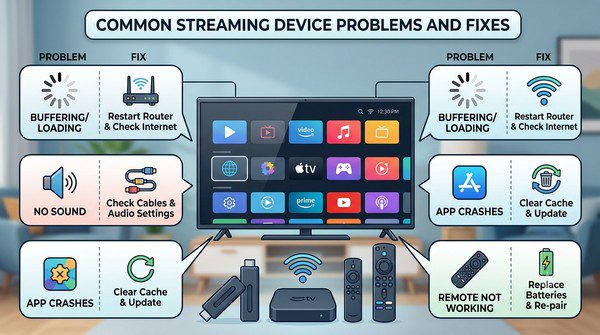
Problem: Buffering During Playback
Buffering is one of the most common streaming problems. It happens when your device cannot download video data quickly enough to keep playback smooth.
Possible Causes
- Slow internet speed.
- Weak Wi-Fi signal.
- Network congestion.
- High video resolution.
How to Fix It
- Restart your router.
- Move the streaming device closer to your Wi-Fi router.
- Use an Ethernet connection if your device supports it.
- Reduce streaming quality from 4K to 1080p if needed.
- Pause the video for a minute to allow buffering.
Problem: Streaming Device Freezes
If your streaming device becomes unresponsive or freezes during use, it may simply need a restart.
Possible Causes
- Temporary software error.
- Running too many background processes.
- Outdated system software.
How to Fix It
- Restart the streaming device.
- Disconnect the power for 30 seconds before reconnecting it.
- Install the latest software updates.
- Close apps that are not in use if your device supports multitasking.
Problem: Apps Keep Crashing
If a streaming app suddenly closes or won’t open, the issue is often limited to that specific app rather than the entire device.
Possible Causes
- Outdated app version.
- Temporary software bug.
- Corrupted app data.
How to Fix It
- Update the app.
- Restart the streaming device.
- Remove and reinstall the app.
- Check whether the streaming service is experiencing an outage.
Problem: Poor Picture Quality
If videos appear blurry or lower in quality than expected, your streaming service may be reducing the resolution automatically.
Possible Causes
- Slow internet speed.
- Automatic quality adjustment.
- Incorrect TV settings.
How to Fix It
- Test your internet connection.
- Select a higher streaming quality if available.
- Make sure your TV supports the selected resolution.
- Use a high-quality HDMI cable for compatible devices.
Problem: No Internet Connection
Your streaming device may suddenly lose its internet connection even though other devices appear to work normally.
Possible Causes
- Wi-Fi interruption.
- Router problems.
- Incorrect network settings.
How to Fix It
- Restart your router.
- Reconnect the device to Wi-Fi.
- Forget the network and connect again.
- Move the router closer if the signal is weak.
Problem: Streaming Device Runs Slowly
Over time, some streaming devices may feel slower than when they were new.
Possible Causes
- Limited storage space.
- Too many installed apps.
- Old software.
How to Fix It
- Delete apps you no longer use.
- Restart the device regularly.
- Install software updates.
- Clear temporary app data if your device allows it.
Problem: Remote Control Stops Working
A non-responsive remote can make it seem like the streaming device itself has failed.
Possible Causes
- Weak batteries.
- Pairing issue.
- Blocked signal.
How to Fix It
- Replace the batteries.
- Restart the streaming device.
- Re-pair the remote if required.
- Remove any objects blocking the signal.
Problem: No Sound
If the picture is visible but there is no audio, the issue could be related to your TV, streaming device, or the streaming app.
Possible Causes
- Muted television.
- Incorrect audio output.
- HDMI connection problem.
How to Fix It
- Check your TV volume.
- Reconnect the HDMI cable.
- Restart both the TV and streaming device.
- Try another streaming app to identify whether the issue is app-specific.
Problem: Device Overheats
Streaming devices generate heat during normal operation. However, excessive heat can affect performance.
Possible Causes
- Poor ventilation.
- Dust buildup.
- Continuous use for long periods.
How to Fix It
- Keep the device in an open area.
- Do not place objects on top of it.
- Allow it to cool before using it again.
- Clean dust from nearby ventilation areas.
General Maintenance Tips
Regular maintenance helps prevent many common streaming problems.
- Keep your device updated.
- Restart it occasionally.
- Update streaming apps regularly.
- Remove unused apps.
- Use a stable internet connection.
- Keep the device well ventilated.
When Should You Reset the Device?
If problems continue after trying basic troubleshooting, performing a factory reset may solve persistent software issues.
Keep in mind that a factory reset usually removes your installed apps, saved settings, and account information. You’ll need to set up the device again afterward.
Factory resets should generally be used only after simpler solutions have failed.
Common Myths About Streaming Device Problems
Myth: Every Problem Means the Device Is Broken
False. Most streaming issues are caused by internet connections, temporary software bugs, or outdated apps rather than hardware failure.
Myth: Buying a New Device Always Solves Streaming Problems
False. If your internet connection is slow or unstable, a new streaming device may experience the same problems.
Myth: Restarting Doesn’t Help
False. Restarting clears temporary system errors and is one of the most effective troubleshooting steps for many common issues.
Frequently Asked Questions
Why does my streaming device keep buffering?
Buffering is usually caused by a slow or unstable internet connection, although heavy network traffic and high streaming resolutions can also contribute.
How often should I restart my streaming device?
Restarting every few weeks or whenever you notice slow performance can help keep the device running smoothly.
Should I keep my streaming apps updated?
Yes. App updates often include bug fixes, security improvements, and better compatibility with streaming services.
Why won’t one streaming app open?
If only one app is affected, updating or reinstalling that app usually resolves the issue.
When should I replace my streaming device?
If your device no longer receives software updates, struggles to run modern apps, or continues having problems after troubleshooting, upgrading to a newer model may provide a better streaming experience.
Most streaming device problems can be solved with a few simple troubleshooting steps. Restarting the device, updating software, improving your internet connection, and keeping your apps current will resolve many common issues without the need for repairs or replacement.
Learning these basic fixes can save time, reduce frustration, and help you enjoy smoother streaming whether you’re watching movies, live sports, TV shows, or free streaming channels.