Do Streaming Devices Need Wi-Fi?
If you’re planning to buy a streaming device, one of the first questions you may have is whether it needs Wi-Fi to work. Streaming sticks and boxes are designed to access movies, TV shows, live channels, sports, and other online content, so they need some type of internet connection for most streaming services.
However, Wi-Fi is not always required. Depending on the device, you may be able to connect it to the internet using an Ethernet cable. Some devices also have limited functions that work without an internet connection.
Understanding how streaming devices connect to the internet can help you choose the right equipment and avoid problems such as buffering, slow loading, and connection drops.
Do Streaming Devices Need an Internet Connection?
For online streaming, yes. A streaming device needs an internet connection to access content from services such as Netflix, YouTube, Disney+, live TV platforms, and other streaming apps.
The device itself does not normally contain the movies and TV shows you want to watch. Instead, it connects to a streaming service over the internet and receives the video as you watch it.
This is different from a traditional DVD player, where the content is stored on a physical disc.
Without an internet connection, most streaming apps will not be able to play their online content.
Does the Internet Connection Have to Be Wi-Fi?
No.
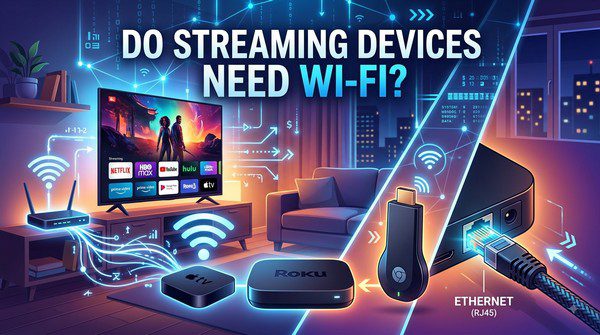
A streaming device can potentially connect to the internet through Wi-Fi or Ethernet, depending on the device and available accessories.
Wi-Fi is the most common option because it does not require a network cable running from your router to the TV. This makes it especially convenient for streaming sticks connected to televisions in different rooms.
Ethernet uses a physical network cable. It can provide a more stable connection and may be useful if your Wi-Fi signal is weak.
How Wi-Fi Works With a Streaming Device
When you connect a streaming device to Wi-Fi, the device communicates wirelessly with your home router.
The router connects to your internet service, while the streaming device uses that connection to access online content.
The basic process looks like this:
- Your internet provider connects your home to the internet.
- Your router creates a Wi-Fi network.
- Your streaming device connects to the Wi-Fi network.
- You open a streaming app.
- The app receives video data from the streaming service.
- The device sends the video and audio to your television.
What Is Ethernet?
Ethernet is a wired network connection that uses a cable to connect a device directly to a router or network switch.
Unlike Wi-Fi, Ethernet does not rely on a wireless signal between the streaming device and your router.
This can be useful when the TV is close enough to the router for a cable connection.
Wi-Fi vs Ethernet for Streaming
| Feature | Wi-Fi | Ethernet |
|---|---|---|
| Connection type | Wireless | Wired |
| Setup | Easy and flexible | Requires a network cable |
| Mobility | Excellent | Limited by cable length |
| Stability | Depends on signal quality | Generally very stable |
| Interference | Possible | Very low |
For most homes, good-quality Wi-Fi is more than sufficient for streaming. Ethernet becomes more attractive when wireless performance is unreliable.
Which Is Better for Streaming?
There is no universal answer. The better option depends on your home network and the location of your TV.
A strong Wi-Fi connection can provide excellent streaming performance without the inconvenience of running cables through your home.
Ethernet can be a better choice if your router is near the television or if thick walls, distance, or interference make Wi-Fi unreliable.
What Internet Speed Do You Need?
Your required internet speed depends on the quality of video you want to stream and how many devices are using the connection at the same time.
As a general guide, HD streaming requires considerably less bandwidth than 4K streaming.
- Standard definition: relatively low bandwidth requirements.
- HD: moderate internet speed is usually sufficient.
- 4K: requires substantially more bandwidth and a stable connection.
The exact requirements vary between streaming services, and your available bandwidth can also be shared with phones, computers, game consoles, and other devices.
What Happens If Wi-Fi Is Weak?
A weak Wi-Fi signal can cause several streaming problems.
You may notice:
- Buffering.
- Long loading times.
- Lower picture quality.
- Video pauses.
- Connection errors.
Many streaming services automatically reduce video quality when the connection becomes slower. This can prevent constant interruptions but may result in a blurry picture.
How to Improve Wi-Fi for Streaming
If your streaming device has a poor wireless connection, there are several things you can try before replacing the device.
- Move the router closer to the TV.
- Place the router in an open area.
- Restart your router.
- Reduce unnecessary wireless interference.
- Use a newer Wi-Fi router if your current equipment is outdated.
- Consider a mesh Wi-Fi system for larger homes.
- Use Ethernet when practical.
Can You Use a Streaming Device Without Internet?
Most streaming devices are designed primarily for online content, so their usefulness is limited without an internet connection.
Some devices may still allow you to access certain local functions, settings, or previously downloaded content, depending on the platform and app.
However, you generally cannot expect services such as Netflix or live streaming platforms to work normally without an internet connection.
Can You Use Mobile Hotspot Instead of Wi-Fi?
Yes, in many cases you can connect a streaming device to a smartphone’s mobile hotspot.
The streaming device treats the hotspot like another Wi-Fi network.
However, this may not be practical for regular streaming because video can use a significant amount of mobile data. It can also be affected by cellular signal quality and your mobile plan’s data limits.
Do Smart TVs Need Wi-Fi Too?
Smart TVs work in a similar way to standalone streaming devices. Their built-in streaming apps generally need an internet connection to access online content.
Depending on the TV model, you can usually connect it using Wi-Fi or Ethernet.
Common Myths About Streaming Devices and Wi-Fi
Myth: Every Streaming Device Must Use Wi-Fi
Not necessarily. Some streaming devices support Ethernet directly, while others may support it through a compatible adapter.
Myth: Faster Internet Always Means Better Wi-Fi
Not exactly. A fast internet plan does not guarantee a strong wireless signal. Your router’s location, distance, interference, and home layout can all affect Wi-Fi performance.
Myth: Ethernet Is Always Necessary for 4K
No. A strong and stable Wi-Fi connection can handle 4K streaming on compatible equipment. Ethernet is simply another way to achieve a reliable connection.
Frequently Asked Questions
Can I use a streaming device without Wi-Fi?
Yes, if the device supports a wired Ethernet connection or another compatible internet connection. Wi-Fi itself is not always required, but online streaming generally requires internet access.
Is Ethernet better than Wi-Fi for streaming?
Ethernet is generally more consistent because it avoids wireless interference, but a strong Wi-Fi connection can provide excellent streaming performance.
Can I connect a Fire TV Stick or Roku to Ethernet?
Some models can use Ethernet through compatible adapters or accessories. Check the specifications of your particular model before purchasing an adapter.
Can I stream with a phone hotspot?
Yes. A mobile hotspot can provide internet access to many streaming devices, although data usage can be high, particularly when watching HD or 4K video.
Why does my streaming device keep losing Wi-Fi?
Possible causes include a weak signal, router problems, wireless interference, network congestion, or software issues. Restarting your router and moving the device or router closer together can help.
Choosing the Right Connection for Your Home
For most cord-cutters, Wi-Fi is the simplest way to connect a streaming device. It keeps your setup clean and allows you to place the TV almost anywhere within your wireless network’s coverage area.
If your streaming device is close to your router, an Ethernet connection can be worth considering. It can provide a stable connection and is particularly useful for households where several devices are using Wi-Fi at the same time.
The most important thing is not whether you choose Wi-Fi or Ethernet, but whether the connection is fast and stable enough for the content you want to watch.
Streaming devices do need internet access for most online streaming, but they do not necessarily need Wi-Fi. A wired Ethernet connection can work on compatible devices and may provide a more consistent connection in some homes.
For most people, a reliable Wi-Fi network is more than enough. If you experience frequent buffering or connection problems, however, checking your Wi-Fi signal, improving your network setup, or switching to Ethernet may make a noticeable difference.