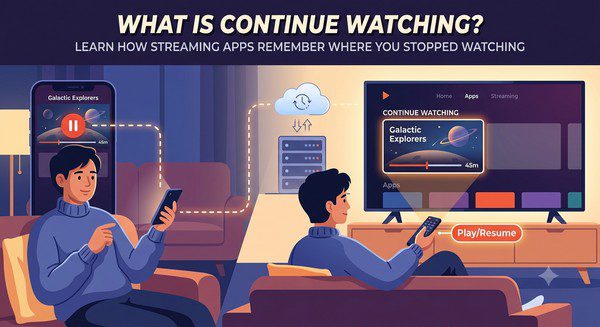
What Is Continue Watching?
Modern streaming apps are designed to make watching movies and TV shows easier and more convenient. One of the most useful features available on almost every major streaming platform is Continue Watching. This feature allows you to return to a movie, TV episode, or series exactly where you stopped watching.
Instead of searching for the title again and manually finding your place, streaming apps automatically remember your viewing progress and display unfinished content in a dedicated section.
Whether you paused a movie before going to sleep, stopped watching an episode halfway through, or switched from your TV to your phone, the Continue Watching feature helps you continue your entertainment without starting over.
In this guide, you’ll learn how Continue Watching works, why it is useful, how it differs from watchlists, and how to manage it across your streaming devices.
What Is the Continue Watching Feature?
Continue Watching is a feature that tracks your viewing progress and saves your place in movies and TV shows.
When you stop watching something before it finishes, the streaming app records where you stopped. The next time you open the app, the title appears in the Continue Watching section so you can quickly resume playback.
For example, if you watch 35 minutes of a 2-hour movie and close the app, the service remembers your progress. When you return later, the movie can continue from approximately the same point.
How Does Continue Watching Work?
The feature works by saving your playback information to your streaming account.
When you watch content, the streaming service records information such as:
- The movie or episode you watched.
- Your current playback position.
- Your viewing history.
- The device you used.
This information is usually stored online, which means it can sync across supported devices.
For example, you can start watching a show on your Smart TV, pause it, and continue later on your smartphone or laptop.
Benefits of Continue Watching
Saves Time
Without this feature, you would need to search for the title again and manually find the exact moment where you stopped.
Makes Multiple Devices Easier to Use
Many people watch content across different devices. Continue Watching allows your viewing progress to follow you wherever you watch.
Helps Track TV Series
For long television series, this feature makes it easier to remember which episode you were watching and where you left off.
Creates a Personalized Experience
Continue Watching is part of a larger system that helps streaming services personalize recommendations based on your viewing habits.
Continue Watching vs Watchlist
Although these two features are related, they serve different purposes.
| Feature | Continue Watching | Watchlist |
|---|---|---|
| Main Purpose | Resume unfinished content | Save content for later |
| Added Automatically | Usually yes | No |
| Tracks Progress | Yes | No |
| Used For | Movies and shows already started | Movies and shows you want to watch |
For example, if you find a movie you want to watch next week, you add it to your watchlist. If you already started watching it, it appears in Continue Watching.
Can You Remove Titles From Continue Watching?
Yes. Most streaming platforms allow you to remove unwanted titles from your Continue Watching section.
This can be useful when:
- You started a movie but decided not to finish it.
- You accidentally opened a show.
- You want a cleaner homepage.
- You finished watching content but it still appears.
The exact removal process depends on the streaming service and device you are using.
Why Do Some Titles Stay in Continue Watching?
Sometimes a movie or TV show remains in Continue Watching even after you finish it.
This can happen because:
- The playback did not reach the ending credits.
- The app has not updated your viewing history.
- The service keeps recently watched content visible.
- You watched only part of a series.
Usually, manually removing the title or refreshing the app solves the issue.
Does Continue Watching Work Across Devices?
Most major streaming platforms synchronize Continue Watching between devices as long as you are signed into the same account.
This allows you to:
- Start a movie on your television.
- Continue on your tablet.
- Finish on your computer.
This feature is especially useful for households where viewers regularly switch between different screens.
Continue Watching and Multiple Profiles
Many streaming services support multiple user profiles, allowing each person in a household to have a separate Continue Watching list.
This prevents your viewing history from mixing with other family members.
For example, children can have their own profile with children’s content, while adults can maintain separate recommendations and viewing progress.
Common Problems With Continue Watching
Although the feature is usually reliable, users may occasionally experience problems.
- Titles not appearing after watching.
- Movies restarting from the beginning.
- Finished shows remaining in the list.
- Progress not syncing between devices.
Possible solutions include updating the app, signing out and back in, restarting the device, or checking your internet connection.
Tips for Managing Continue Watching
- Remove titles you no longer plan to watch.
- Use separate profiles for different household members.
- Keep your streaming apps updated.
- Check your viewing history if progress appears incorrect.
- Use watchlists for content you have not started yet.
Common Myths About Continue Watching
Myth: Continue Watching Downloads Videos
False. The feature only saves your viewing progress. It does not download movies or TV shows to your device.
Myth: Continue Watching Uses Extra Storage
False. Your progress information is stored with your account and requires very little data.
Myth: You Cannot Remove Items
False. Most streaming platforms provide options to remove or manage titles in your Continue Watching section.
Frequently Asked Questions
Does Continue Watching work without an account?
Usually no. Most streaming services need an account to save and synchronize your viewing progress.
Can I disable Continue Watching?
Some platforms provide limited control over viewing history, but the option depends on the service.
Why did my Continue Watching list disappear?
This may happen if you signed out, changed profiles, cleared app data, or experienced a synchronization issue.
Does Continue Watching remember every device?
Most services remember supported devices connected to the same account, although availability varies by platform.
Is Continue Watching available on free streaming apps?
Many free streaming platforms also include similar resume features, especially when users create an account.
The Continue Watching feature has become an essential part of modern streaming because it removes one of the biggest frustrations of digital entertainment: losing your place. By automatically saving your progress and syncing between devices, it makes watching movies and TV shows more convenient and personalized.
Whether you watch occasionally or spend hours exploring streaming libraries, understanding how Continue Watching works can help you get more from your favorite apps and keep your entertainment experience organized.