HDMI Explained for Streaming Devices
If you’ve ever set up a streaming device, you’ve probably come across the term HDMI. Nearly every modern streaming stick, streaming box, gaming console, and Blu-ray player uses HDMI to connect to a television.
Although HDMI is something most people use every day, many don’t know what it actually does. Fortunately, you don’t need to understand complicated technology to use it. HDMI was designed to make connecting devices simple while delivering excellent picture and sound quality.
This guide explains what HDMI is, how it works, why it’s important for streaming devices, and answers some of the most common questions beginners have.
What Is HDMI?
HDMI stands for High-Definition Multimedia Interface.
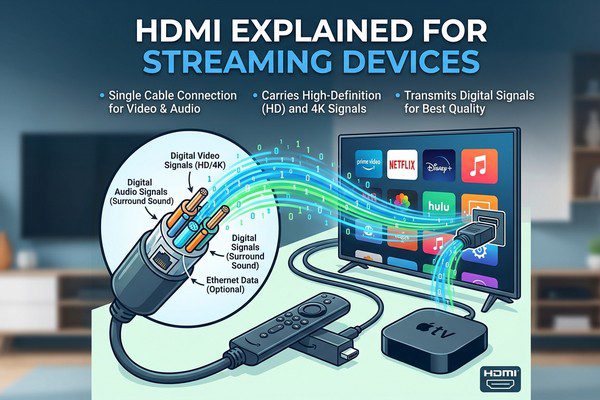
It is a connection standard that carries both high-quality video and audio through a single cable.
Before HDMI became common, televisions often required separate cables for video and sound. HDMI simplified everything by combining both signals into one connection.
Today, HDMI is the standard connection used by most modern TVs and streaming devices.
Why Is HDMI Important for Streaming Devices?
Streaming devices need a way to send movies, TV shows, and other content to your television.
HDMI provides that connection.
When you plug a streaming device into an HDMI port, it sends digital video and audio directly to your TV with excellent quality.
Without HDMI, using most modern streaming devices would be much more difficult.
How Does HDMI Work?
The process is surprisingly simple.
- Your streaming device receives video and audio from the internet.
- The device processes the content.
- The HDMI connection sends both picture and sound to your TV.
- Your television displays the video and plays the audio.
Everything happens almost instantly, allowing you to enjoy smooth streaming.
Where Is the HDMI Port?
Most televisions have one or more HDMI ports located on the back or side of the TV.
They are usually labeled with names such as:
- HDMI 1
- HDMI 2
- HDMI 3
- HDMI ARC
- HDMI eARC
When connecting a streaming device, simply plug it into an available HDMI port and select the matching input using your TV remote.
Do All Streaming Devices Use HDMI?
Almost all modern streaming devices connect through HDMI.
This includes:
- Streaming sticks.
- Streaming boxes.
- Many gaming consoles.
- Media players.
If your television has an HDMI port, it will likely be compatible with most current streaming devices.
HDMI Versions
Over the years, HDMI has been updated to support higher video resolutions and additional features.
| HDMI Version | Supports |
|---|---|
| HDMI 1.4 | Up to 4K at lower frame rates |
| HDMI 2.0 | 4K at 60 frames per second |
| HDMI 2.1 | Higher resolutions, higher frame rates, and advanced gaming features |
Most streaming users don’t need to worry about HDMI versions unless they’re buying new equipment or planning to stream high-resolution content.
Can HDMI Improve Picture Quality?
HDMI itself doesn’t improve the quality of a video.
Instead, it allows your streaming device to deliver the highest quality supported by both the device and your television.
If you’re watching 4K content on a compatible TV using a compatible streaming device, HDMI carries that high-quality signal to the screen.
What Is HDMI ARC?
ARC stands for Audio Return Channel.
It allows audio to travel in both directions through a single HDMI cable.
This feature is commonly used with:
- Soundbars.
- Home theater receivers.
- External speaker systems.
ARC reduces cable clutter by eliminating the need for a separate audio cable.
What Is HDMI eARC?
Enhanced Audio Return Channel (eARC) is an improved version of ARC.
It supports higher-quality audio formats and provides more reliable communication between compatible televisions and audio equipment.
For basic streaming, ARC is often sufficient, but home theater enthusiasts may benefit from eARC if all their devices support it.
Do HDMI Cables Matter?
For most streaming setups, a standard certified HDMI cable works perfectly well.
You don’t need the most expensive cable to enjoy clear picture and sound.
However, if you’re streaming in 4K or using newer HDMI features, it’s important to choose a cable that supports the capabilities of your equipment.
Common HDMI Problems
Although HDMI is generally reliable, occasional issues can occur.
No Picture
Check that your TV is set to the correct HDMI input and make sure the cable is securely connected.
No Sound
Verify your TV’s volume settings and restart both the streaming device and television.
Intermittent Signal
A loose cable or damaged HDMI cable may cause the picture to disappear temporarily.
Resolution Problems
Make sure both your TV and streaming device support the selected video resolution.
Tips for Better HDMI Performance
- Use a certified HDMI cable.
- Insert the cable securely into both devices.
- Avoid sharply bending the cable.
- Select the correct HDMI input on your TV.
- Keep your streaming device’s software updated.
Common Myths About HDMI
Myth: Expensive HDMI Cables Always Produce Better Picture Quality
False. For most streaming setups, a properly certified HDMI cable provides the same picture and sound quality as a much more expensive one.
Myth: Every HDMI Port Is Different
False. Most HDMI ports perform similarly, although some televisions reserve specific ports for features like ARC, eARC, or higher refresh rates.
Myth: HDMI Is Only for Streaming Devices
False. HDMI is also used by gaming consoles, Blu-ray players, laptops, desktop computers, projectors, and many other electronic devices.
Frequently Asked Questions
Do I need an HDMI cable for every streaming device?
Streaming boxes usually require an HDMI cable. Many streaming sticks plug directly into the TV’s HDMI port and do not require a separate cable.
Can an older TV use a streaming device?
If the TV has an HDMI port, it can usually work with modern streaming devices. Older TVs without HDMI may require adapters, although compatibility varies.
Can HDMI carry both picture and sound?
Yes. One HDMI connection carries both digital video and audio.
Can I plug a streaming device into any HDMI port?
Yes. Most HDMI ports work for streaming devices, although you may prefer specific ports if you’re also using soundbars or other audio equipment.
How many HDMI ports does a TV usually have?
Most modern televisions include between two and four HDMI ports, though the exact number depends on the model.
HDMI is one of the most important technologies behind modern streaming. It allows streaming devices to deliver high-quality video and audio to your television through a single, simple connection. Whether you’re watching movies, live sports, TV shows, or free streaming channels, HDMI helps ensure a reliable and enjoyable viewing experience.
Understanding the basics of HDMI makes setting up a streaming device much easier. Once connected correctly, you can focus less on cables and more on enjoying your favorite entertainment.