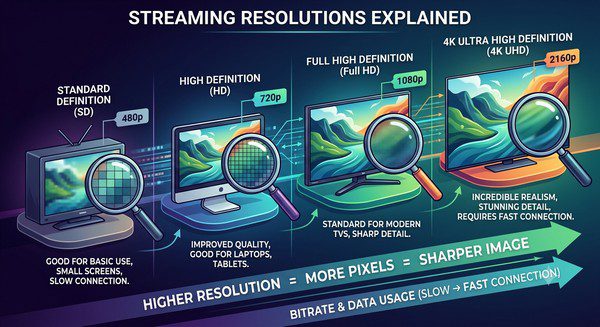
Streaming Resolutions Explained
When you’re watching a movie or TV show online, you’ve probably seen options like 480p, 720p, 1080p, and 4K. These numbers represent different video resolutions, and they have a direct impact on picture quality, internet usage, and your overall streaming experience.
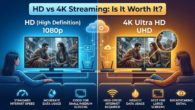
Choosing the highest resolution isn’t always the best option. Your TV, internet speed, and even the size of your screen can determine whether you’ll notice a difference. In some cases, streaming in Full HD instead of 4K can provide a smoother viewing experience while using much less bandwidth.
This guide explains the most common streaming resolutions, how they compare, and which one may be right for your home.
What Is Streaming Resolution?
Streaming resolution refers to the number of pixels used to display a video image.
Pixels are tiny dots that make up every picture on your screen. The more pixels a video contains, the sharper and more detailed the image usually appears.
Higher resolutions generally provide better picture quality, but they also require more internet bandwidth and may use more data.
Common Streaming Resolutions
| Resolution | Common Name | Picture Quality | Typical Use |
|---|---|---|---|
| 640 × 480 | 480p (SD) | Basic | Older content and slow internet |
| 1280 × 720 | 720p (HD) | Good | Everyday streaming |
| 1920 × 1080 | 1080p (Full HD) | Excellent | Most movies and TV shows |
| 3840 × 2160 | 4K Ultra HD | Outstanding | Premium streaming and large TVs |
480p (Standard Definition)
480p, often called Standard Definition (SD), was once the standard resolution for DVDs and older television broadcasts.
Today, it is mostly used when internet speeds are slow or when watching older video content.
While 480p remains perfectly watchable on smaller screens, the image appears noticeably less detailed on modern televisions.
720p (High Definition)
720p is known as High Definition (HD).
Compared to 480p, it provides a much clearer picture with improved detail and sharper text. It remains a practical option for viewers with moderate internet speeds and works well on smaller televisions, laptops, and tablets.
Many live broadcasts and streaming services continue to use 720p for certain content.
1080p (Full HD)
1080p, often called Full HD, is one of the most common streaming resolutions today.
It offers excellent image quality for movies, TV shows, sports, and live television. On most TVs, Full HD delivers a sharp and enjoyable picture without requiring the higher bandwidth needed for 4K streaming.
For many households, 1080p provides the best balance between quality and internet usage.
4K Ultra HD
4K Ultra HD contains approximately four times as many pixels as Full HD.
The extra detail makes images appear sharper, especially on larger televisions. Many 4K titles also support HDR (High Dynamic Range), improving brightness, contrast, and color accuracy on compatible equipment.
To fully enjoy 4K streaming, you’ll need:
- A 4K television or monitor.
- A compatible streaming device.
- A streaming service that offers 4K content.
- A fast and stable internet connection.
How Resolution Affects Internet Usage
Higher resolutions require more data because they contain more visual information.
In general:
- 480p uses the least data.
- 720p uses more than 480p.
- 1080p uses more than 720p.
- 4K uses the most data.
If your internet connection is slow or your monthly data allowance is limited, choosing a lower resolution may provide smoother playback while reducing data usage.
Does Higher Resolution Always Look Better?
Not necessarily.
Several factors influence how much improvement you’ll actually notice:
- Screen size.
- Viewing distance.
- Video quality.
- Your eyesight.
- The quality of your TV.
On a small screen, the difference between 1080p and 4K may be difficult to notice. On a large television viewed from a close distance, 4K often provides visibly sharper detail.
Can Streaming Services Change Resolution Automatically?
Yes.
Most streaming services automatically adjust video quality based on your internet speed.
If your connection slows down, the service may temporarily switch from 4K to 1080p or even lower resolutions to reduce buffering and keep playback smooth.
Some apps also allow you to choose your preferred streaming quality manually.
Which Resolution Should You Choose?
- 480p: Suitable for slow internet connections or older devices.
- 720p: Good for casual viewing and moderate internet speeds.
- 1080p: Ideal for most households and modern televisions.
- 4K: Best for large TVs, premium content, and viewers who want the highest picture quality.
The right choice depends on your equipment and internet connection rather than simply selecting the highest available resolution.
Tips for Better Streaming Quality
- Use a reliable internet connection.
- Keep your streaming apps updated.
- Connect your streaming device with Ethernet if possible.
- Close unnecessary downloads while streaming.
- Choose a resolution that matches your connection speed.
Common Myths About Streaming Resolution
Myth: Higher Resolution Always Means Better Streaming
False. If your internet connection can’t keep up, streaming at a lower resolution may actually provide a smoother viewing experience with less buffering.
Myth: You Always Need 4K
False. Full HD (1080p) continues to offer excellent picture quality and remains the preferred resolution for many viewers.
Myth: Resolution Is the Only Factor That Affects Picture Quality
False. HDR support, video compression, display quality, and internet stability also influence how good a video looks.
Frequently Asked Questions
What is the best streaming resolution?
There isn’t one best resolution for everyone. Full HD is ideal for many households, while 4K is best suited for compatible TVs and fast internet connections.
Does 4K always use more internet data?
Yes. Because 4K contains much more visual information than lower resolutions, it generally requires more bandwidth and uses more data.
Can I watch 4K on an HD TV?
Yes, but the video will usually be displayed at your TV’s maximum supported resolution, such as 1080p.
Why does my streaming quality change automatically?
Most streaming services adjust video resolution based on your current internet speed to reduce buffering and maintain uninterrupted playback.
Is 720p still good enough?
Yes. While it isn’t as detailed as Full HD or 4K, 720p still provides good picture quality for many types of content, especially on smaller screens.
Understanding streaming resolutions makes it easier to choose the right video quality for your home. While 4K delivers the sharpest picture, it also requires more bandwidth and compatible equipment. Full HD remains an excellent choice for most viewers, offering crisp visuals without demanding as much from your internet connection.
By matching your streaming resolution to your TV, internet speed, and viewing habits, you can enjoy smoother playback, reduce buffering, and get the best possible experience from your favorite streaming services.