How DVR Works for Streaming TV
One of the biggest concerns people have when switching from cable TV to streaming is whether they’ll still be able to record their favorite programs. Fortunately, the answer is yes. Most live TV streaming services now include a feature called Cloud DVR, which allows you to record live television without needing a physical DVR box in your home.
Cloud DVR has become one of the most useful features offered by streaming services. Whether you want to save a sporting event, record your favorite TV series, or watch the evening news later, Cloud DVR makes it easy to enjoy live television on your own schedule.
In this guide, you’ll learn how DVR works for streaming TV, how Cloud DVR differs from traditional DVR systems, its advantages and disadvantages, and what features you should look for before choosing a streaming service.
What Is DVR?
DVR stands for Digital Video Recorder. It is a system that records television programs so you can watch them later instead of viewing them live.
Traditional cable companies usually provide a DVR box that connects directly to your television. The recordings are stored on a hard drive inside the device, allowing you to pause, rewind, fast-forward, and replay your favorite programs whenever you want.
While traditional DVRs are still available through some cable providers, streaming services have introduced a more modern solution called Cloud DVR.
What Is Cloud DVR?
Cloud DVR works similarly to a traditional DVR, but instead of storing recordings on a physical device in your home, your recordings are saved securely on remote servers operated by the streaming provider.
This means you don’t need to buy or rent any recording equipment. Everything happens online, and your recordings can usually be accessed from multiple devices using your streaming account.
Whether you’re watching on your Smart TV, smartphone, tablet, or laptop, your saved programs are available wherever your account is supported.
How Does Cloud DVR Work?
The process is surprisingly simple.
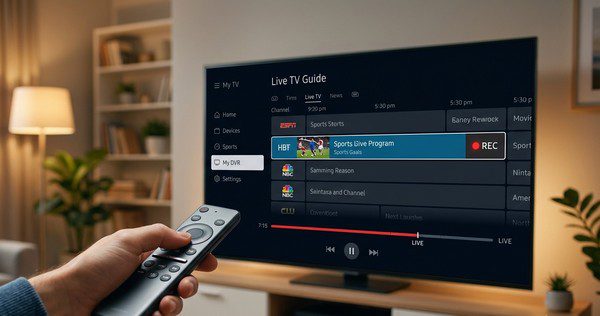
When you’re browsing the live TV guide, you simply select a program and choose the option to record it. The streaming service then automatically saves the broadcast to your Cloud DVR library.
Once the recording is complete, you can watch it whenever you like, provided it remains within your storage limits or retention period.
Most services also allow you to schedule recordings for entire TV series, ensuring every new episode is automatically saved without any additional effort.
How Is Cloud DVR Different from Traditional DVR?
| Feature | Traditional DVR | Cloud DVR |
|---|---|---|
| Storage Location | Inside your DVR box | Remote cloud servers |
| Extra Hardware Required | Yes | No |
| Accessible on Multiple Devices | Usually limited | Yes |
| Maintenance | Hardware updates may be needed | Managed by the provider |
| Risk of Hardware Failure | Possible | Very low |
Benefits of Cloud DVR
Cloud DVR has several advantages that make it appealing for people switching from cable TV.
Watch on Your Schedule
You no longer have to plan your day around TV schedules. Simply record the program and watch it whenever it’s convenient.
No Physical Equipment
Since recordings are stored online, there’s no need for a separate DVR box or external hard drive.
Access from Multiple Devices
Your recordings usually sync across your account, allowing you to start watching on one device and continue on another.
Automatic Series Recording
Many streaming services let you record an entire series with a single click, automatically saving every new episode.
Easy Management
Deleting recordings, organizing your library, and finding saved programs is usually much simpler than with older cable DVR systems.
Possible Limitations
Although Cloud DVR is very convenient, there are a few limitations to keep in mind.
- Storage limits vary between providers.
- Some recordings expire after a certain period.
- Fast-forwarding through commercials may not always be available.
- An internet connection is required to access your recordings.
- Features vary depending on your subscription plan.
How Much Storage Do You Need?
The amount of Cloud DVR storage you’ll need depends on how much television you watch.
If you only record a few shows each week, even basic storage may be enough. Families that regularly record sports, movies, and multiple TV series may benefit from services that offer larger or unlimited DVR storage.
Many streaming providers have increased their storage limits in recent years, making Cloud DVR much more practical than it was when streaming first became popular.
Can You Skip Commercials?
Whether you can skip advertisements depends on the streaming service and, in some cases, the channel being recorded.
Some providers allow users to fast-forward through recorded commercials, while others restrict this feature for certain content because of licensing agreements.
It’s worth checking a provider’s DVR features before subscribing if commercial skipping is important to you.
Who Should Use Cloud DVR?
Cloud DVR is useful for almost any television viewer, but it’s especially valuable if you:
- Watch live sports.
- Have a busy schedule.
- Don’t want to miss favorite TV shows.
- Prefer watching programs without following a fixed broadcast schedule.
- Share a streaming account with family members.
Tips for Getting the Most from Cloud DVR
- Record entire TV series instead of individual episodes.
- Review your recordings regularly and remove programs you no longer need.
- Check your available storage if your provider has limits.
- Keep your streaming apps updated for the latest DVR features.
- Use a stable internet connection for smooth playback.